
#proxmox
#debian
#linux
Sending Proxmox VE 8 Syslogs to a Log Aggregator
A Log Aggregator or Log Management system allows you to delve into system and software logs for many machines, or create alerts for particular issues…

Systemctl is a command line utility that is used to manage systemd services on Linux systems, and if you don’t regularly manage Linux systems, you might find yourself guessing at the syntax before having to look it up.
So if you arrived here because that’s you, here are the basics:
systemctl status servicename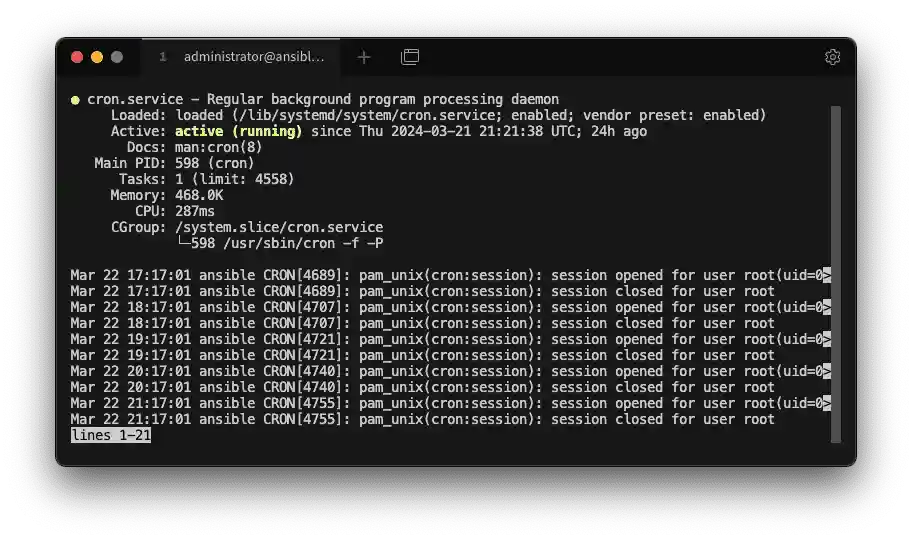
The output will show the path of the loaded service, whether the service is active (running), where to see the documentation for the service (in the above example the command man cron would load the manual for cron). It will also show the most recent log entries for the service.
systemctl start servicenamesystemctl stop servicenameThis will list all services that are in a failed state (i.e. they’ve crashed or errored and stopped). The simple command here is:
systemctl --failedBut this is equivalent to:
systemctl list-units --state=failedEnabling a service means it will start automatically when the system next starts
systemctl enable servicenameWhere as:
systemctl enable --now servicenameThe above will enable the service for automatic start on next reboot but it will also immediately start the service too.
This is the opposite of above–disabling a service will prevent it starting after the next reboot, disable --now will do the same but also immediately stop the service.
systemctl disable servicename
systemctl disable --now servicenameThese are some basic commands, but if there’s anything you regularly forget, please leave a comment so I can add it here!
Share this article:
A Log Aggregator or Log Management system allows you to delve into system and software logs for many machines, or create alerts for particular issues…

While testing out OMV on a variety of hardware, I was looking to install the plugin (to decrease the wear of the USB onto which I'd installed OMV -…
This post will show you how to get Home Assistant OS running as a VM on a Proxmox VE host in just a couple of minutes.